
Zombies Arent Real Upgrades: Level Up and SP
Zombies Arent Real upgrades explained: the $150 level-up, what level two does on a mortar, and how SP upgrades differ from spending money.
There are two upgrade systems in Zombies Arent Real and they look similar enough to confuse: a $150 level-up you buy with mission money, and SP upgrades you spend before the mission starts. One is a purchase, the other is a build choice, and mixing them up wastes both.
The $150 level-up
Select a deployed unit and the panel shows two buttons: Refund (X) and Level Up $150. The level-up is a per-unit purchase during planning or mid-mission, paid from the same wallet as everything else.
What it buys depends on the unit. The mortar's panel states it plainly: Lv2: 3x Fire Rate, Reload. Triple the fire rate and a shorter reload, on a unit whose entire weakness is downtime.
For the mortar the maths is simple. The base weapon fires 5.0 rounds per minute, holds four shells, and reloads in twenty seconds. Level two makes that cycle three times faster, which is the difference between supporting a defense and being a decoration.
For other units the panel wording varies, but the pattern holds: level two amplifies what the unit already does rather than changing its role. A sniper does not become an area weapon; it becomes a better sniper.
When to buy a level-up
Three conditions, all required:
- The unit is already producing kills. Check the per-unit kill column. A mortar at 0.0 is not ready for $150.
- The unit is in the right place. Upgrading a unit you are about to refund is burning money twice.
- You have already funded the civilian layer. $150 is a corridor, a hold order and a hundred safe-zone cells. Those save civilians; a faster mortar mostly kills faster.
If all three hold, the level-up is one of the best purchases in the game, because $150 is roughly half a mortar and it doubles the output of a unit you already paid for.
SP is not money
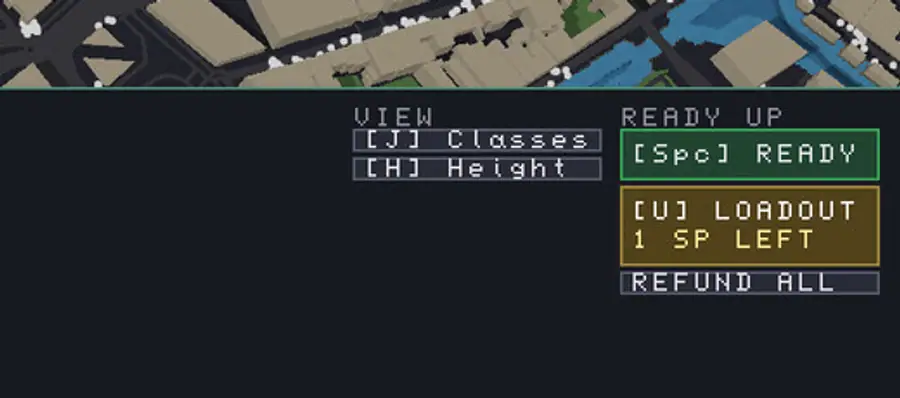
The ready-up panel shows 1 SP LEFT in the launch build, and the loadout button [U] LOADOUT opens where that point is spent. SP is a pre-mission budget that has nothing to do with the deploy wallet.
Two consequences:
- You cannot buy SP. No amount of mission money converts into skill points. It is a fixed allowance per mission.
- You can waste it. Loading a class you do not use, or spending the point on a branch that does not match your plan, is the same as leaving it unspent.
The loadout guide → covers the class side. For the upgrade side, treat SP as a modifier on your plan rather than a substitute for it: an SP choice should make the layout you already intended stronger, not require a different layout.
Upgrade versus new unit
The comparison that matters most often is a level-up against another unit of the same price.
| Spend $150 on | You get | Best when |
|---|---|---|
| Mortar level two | 3x fire rate, shorter reload | The mortar is alive, placed well and killing |
| Two mortars? No: half a mortar plus change | Nothing complete | Never; this is the trap |
| Four snipers' worth of budget | Four new roofs covered | Your existing units are already upgraded |
| Civilians and zones | Corridor plus a hundred cells | The banner is lagging |
That third row is the honest answer most of the time. Four snipers cover four sightlines, while a level-up improves one unit in one place. Unless that one place is where the mission is decided, spread the money.
What not to upgrade
Units in the open. A garrison in a street with no cover will die regardless of level.
Units on a route you have abandoned. The horde is not going there; the upgrade is not either.
The first mortar of a run. Until the map's geometry proves the mortar has a killing field, the $150 belongs in snipers and spikes.
The upgrade checklist
Before pressing Level Up $150, confirm:
- The unit is inside the safe zone if it depends on resupply.
- Its kill count is the highest of its type on the map.
- The civilian layer is funded and the corridor is open.
- You still have reserve money for a breach.
Four yeses, buy it. Anything else, spend the money on ground you have not covered yet, and come back after the next wave. The money guide → has the split that keeps the reserve intact, and the mortar guide → has the full stat sheet this page works from.
Refunding a levelled unit returns the unit, not necessarily the upgrade money. Level up late, and only on units you intend to keep.
Official source: Steam store page ↗ · Steam discussions ↗ · SteamDB ↗
FAQ
How much does a level-up cost?
One hundred and fifty dollars per unit, shown on the selected-unit panel next to the refund button.
What does level two do?
It amplifies the unit's existing role. For the mortar the panel states a triple fire rate and a shorter reload; other units follow the same pattern of improving what they already do.
What is SP in Zombies Arent Real?
Skill points, a pre-mission allowance shown on the ready-up panel and spent in the loadout. SP is separate from mission money and cannot be bought.
Should I upgrade or buy a new unit?
Buy new units until every important sightline and lane is covered, then upgrade the units that are already producing the most kills.
Can I upgrade a unit mid-mission?
Yes, the level-up button is available on the selected-unit panel during play, and refunds remain available on the same panel.