
Zombies Arent Real Co-op: Two-Player Setup Guide
How co-op works in Zombies Arent Real: two players, one city, split classes and budgets, and the roles that keep both fronts covered.
Zombies Arent Real supports online co-op for two players. The store page is specific about the number — one other friend — and the search suggestions around the game confirm that players go looking for it, with coop appearing as a completion on the bare brand term.
Two players on one city map is not twice the defense. It is the same city with two people making decisions, and the decisions are where the value is.
What actually changes
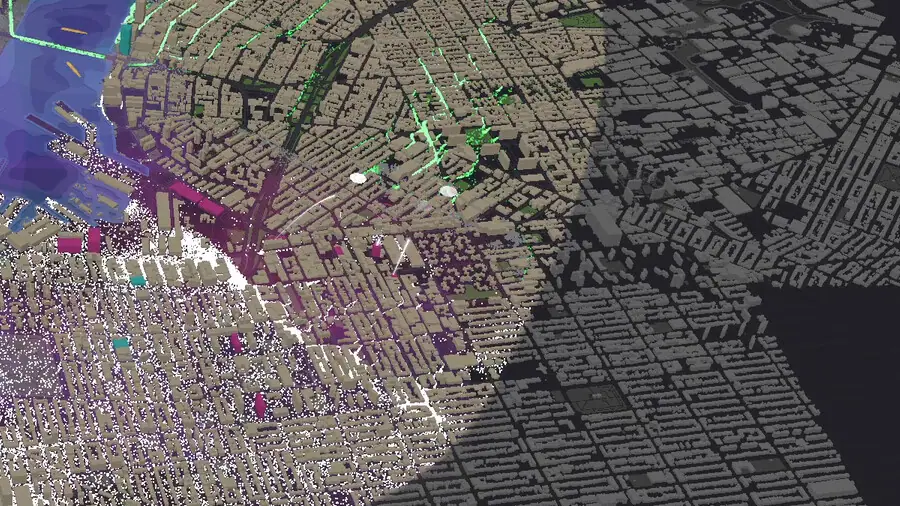
The map does not get bigger. The horde does not shrink. What changes is that two players can hold two separate fronts at the same time, which matters because the infection spreads on multiple axes.
What that buys you:
- Two class choices instead of one, so the loadout can cover holding and damage at once.
- Two budgets, which is not double the money but is twice the ability to seed cheap units early.
- Two pairs of eyes on a map where the infection front moves faster than one camera can follow.
Split by role, not by street
The instinct is to divide the map in half and defend your half. That fails for a structural reason: the infection does not respect the line, and a breach on one side becomes a horde in the other player's rear.
Split by function instead:
| Role | Owns | Units |
|---|---|---|
| Anchor | The corridor, safe zones and gates | Garrison, wall, gate, spikes |
| Hammer | The approaches and the kill zone | Sniper, mortar, turret, support |
The anchor player's job is to keep the evacuation route open and the crowd moving. The hammer player's job is to make the approach expensive enough that the route stays open.
That division also matches the economy. Garrisons scale at $15+, so the anchor can spend small and often. Snipers are $35 and mortars $270, so the hammer needs to save for one good purchase rather than dribble money away.
Decide the exit before you deploy
The single most common co-op failure is two players drawing two corridors to two different exits. Both are half-funded, both have junctions, and neither carries enough traffic to hit ten percent.
The first thirty seconds should settle three things out loud:
- Which exit. One. The one furthest from the initial infection.
- Who anchors it. One player owns the corridor and the gates; the other does not touch them.
- Where the hammer sets up. The street or crossing the horde must pass to reach the corridor.
After that, the run has a spine and improvisation is additive rather than contradictory.
Shared money, separate plans
Co-op budgets are the thing to watch. If both players spend on the same street, the second purchase is wasted; if both save for a mortar at the same time, the corridor sits unguarded for two minutes.
The rhythm that works:
- Anchor spends first. Cheap garrisons at $15 hold a junction while the hammer is still saving.
- Hammer spends on one thing. A single mortar at $270 beats three half-measures.
- Recheck after every purchase. The kill column in the stats panel tells you which unit is actually doing the work.
That last point is why the panel matters in co-op: Kills Per Unit Total shows whether the hammer's investment is paying and whether the anchor's garrisons are holding or merely existing.
Loadout pairings
The class system makes the pairing explicit. Two complementary classes cover the map; two copies of the same class double one plan and leave the other uncovered.
Good pairings follow the role split:
- Anchor class + Hammer class is the default and the safest.
- Economy class + Damage class works if the economy player is disciplined about seeding cheap units early.
- Two anchors is a slow, safe run that will usually miss the civilian threshold because nothing kills the horde quickly enough.
- Two hammers is the classic co-op loss: impressive kill count, no evacuation.
The loadout page → covers what SP does; in co-op the rule is simply that both players spend inside their role.
Custom maps make co-op better
Steam Workshop support is already in the launch build, and the developer's Early Access notes say custom maps can be generated from public geographic data — including zipcodes from anywhere in the world.
For co-op that is the real long-term value: a map you both know, with a geometry you chose, removes the discovery phase and turns the run into execution. The workshop maps guide → covers how that works.

Co-op runs fail in the first minute, not the last. Ten seconds of "I have the corridor, you have the bridge" is worth more than any unit purchase.
Official source: Steam store page ↗ · Steam Community hub ↗ · Steam Workshop ↗
FAQ
How many players can play Zombies Arent Real co-op?
Two: the store page describes playing with one other friend in online co-op.
Is there local split-screen co-op?
Online co-op is what the store page describes. The launch build's deployment UI is built around one screen per player.
Do both players share money?
The deployment screen shows a single budget figure per player view, so treat money as a shared plan rather than a personal pool and coordinate purchases.
Can both players pick the same class?
Yes, and it is usually a mistake: the map does not scale with player count, so two identical classes leave part of the city uncovered.
Does co-op use the same maps as solo?
Yes, plus any Steam Workshop maps either player has subscribed to.