
Zombies Arent Real Loadout: Classes and SP
How the Zombies Arent Real loadout works: the J class list, the U loadout panel, spending SP before ready-up, and the choices that change a run.
The loadout is the part of Zombies Arent Real that happens before the map. J opens the class list, U opens the loadout, and the ready-up panel shows what is left to spend: in the launch build, 1 SP LEFT.
It is easy to skip. The deploy bar is louder, the map is bigger, and SP looks like a modifier rather than a decision. It is not. SP is the only way to change what a unit does before you place it, and the class you bring decides which of your purchases is the one that carries the run.
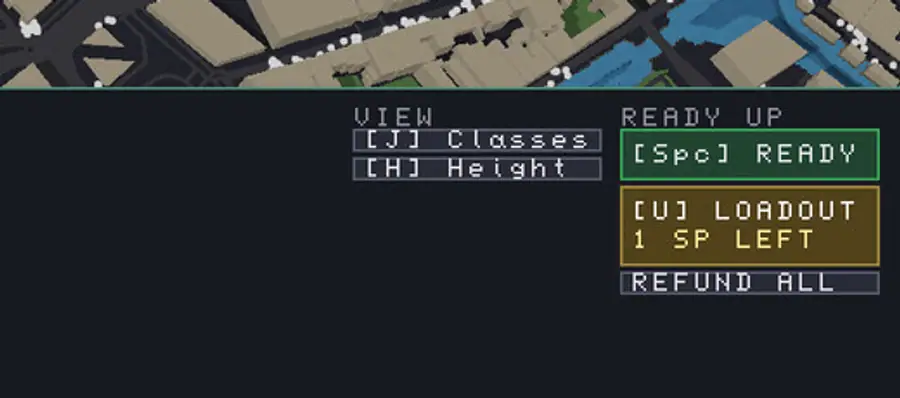
The three panels
The bottom right of the deployment screen holds everything that is not a unit.
| Key | Panel | What it does |
|---|---|---|
J |
View | Opens the class list |
U |
Ready Up | Opens the loadout |
Spc |
Ready Up | Starts the mission |
| — | Ready Up | REFUND ALL wipes the deployment |
Note the ordering: classes and loadout are on the same side because they are the same decision. The class sets the frame; the loadout spends the points inside it.
What SP is for
SP is a per-mission allowance. It is not mission money, it does not convert into units, and it does not carry over. The launch build displayed one point remaining in the capture this page is based on, which is the smallest possible budget to learn the system with.
In practice SP is a pre-mission multiplier on the plan you already intend to run:
- If the plan is a sniper-heavy roof defense, SP should make snipers better rather than diversify into units you will not buy.
- If the plan is a garrison corridor, SP should reinforce holding rather than add firepower you did not budget for.
- If the plan is a mortar line, SP should shorten the downtime that makes the mortar unreliable.
The mistake is spending SP on a branch that sounds strong in isolation. A buff to a unit you never deploy is a point that did nothing.
Classes change the plan, not just the numbers
The class list is the frame the loadout sits in. Two runs with the same map and different classes should produce different deployment lists, not the same list with slightly different numbers.
A useful pre-mission checklist:
- Open
Jand read the classes before touching the map. - Pick the class that matches the map's geometry, not the one you used last time.
- Open
Uand spend every point inside that class. - Only then start deploying, because the units you buy should reflect the class you chose.
Doing it in the other order is how players end up with a mortar build and a garrison class.
The ready-up check
Before pressing Spc, three things should be true:
No SP left. The panel tells you how many remain. Zero is the target; an unspent point is a decision you skipped.
The budget is allocated. Damage, civilians, reserve. If you cannot say what each third is for, the layout is not finished.
The first thirty seconds are predictable. You should know where the horde will appear and which unit will engage first. If not, the height view has not been read yet.
Loadout in co-op
Two players means two loadouts and two class choices, which is the only place where the system can be actively wasted: taking the same class twice gives you a double-strength version of one plan instead of two complementary ones.
Split by role. One player takes the holding build with garrisons and walls; the other takes the damage build with snipers and support. The map does not get bigger when a second player joins, so overlapping classes just means one of you has less to do. The co-op guide → covers the split.
Where the loadout connects to everything else
The loadout is a planning decision, and planning decisions compound. A class that favours cheap bodies makes the garrison's scaling price less of a problem; a class that favours precision makes the sniper's $35 the best line in the budget.
That is why this page sits next to the upgrades guide → rather than on its own: both systems are about making one part of the plan better than its price suggests. Build the plan first, then choose what to amplify. The Steam Community hub ↗ is where class discussions will settle once the meta has a few weeks to form.
Mission money refunds when you reclaim a unit. SP does not: once a point is spent in the loadout, it is spent for that mission. Choose the class before you choose the units.
Official source: Steam store page ↗ · Steam Community hub ↗ · Steam discussions ↗
FAQ
How do I open the loadout in Zombies Arent Real?
Press U on the ready-up panel during the planning phase. The class list opens with J.
What does SP stand for?
Skill points. The ready-up panel shows how many you have left, and they are spent in the loadout before the mission starts.
Can I earn more SP during a mission?
No. SP is a fixed allowance per mission, separate from the deploy budget.
Does the loadout change my units' stats permanently?
It changes them for that mission. The loadout is a pre-mission configuration rather than a permanent upgrade path.
Should both co-op players take the same class?
No. Two complementary classes cover more of the map than two copies of the same one, since the map does not scale with player count.